
Comparisons
Best IPTV Devices in Canada: Firestick vs Android Box
Which device is best for IPTV in Canada? Fire TV Stick 4K Max, Google TV Streamer, NVIDIA Shield, Formuler, Apple TV, Smart TVs and Roku compared.
Guides
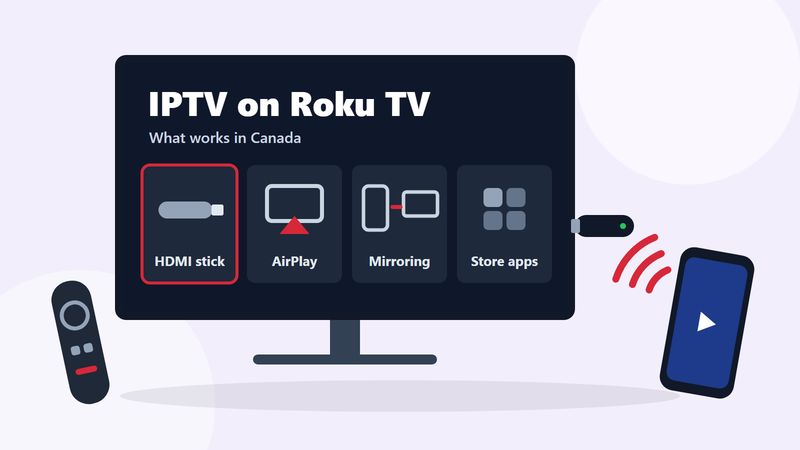
Yes, you can watch IPTV on a Roku TV in Canada, just not the way you would on a Fire TV Stick. Roku only installs apps from its own Streaming Store, and the two players most IPTV viewers rely on, TiviMate and IPTV Smarters Pro, are not in it. The reliable fix is to plug a Fire TV Stick or a Google TV Streamer into a spare HDMI port on the Roku TV and run the player there. AirPlay from an iPhone and screen mirroring from an Android phone also work on many Roku models, with trade-offs.
This guide explains what Roku allows, how each of the four options works, and which one fits your home. If a Roku is the only streaming device you own, test IPTV on a phone or computer with our free 24-hour trial before you pay for anything.
Most IPTV setup guides assume an Android-based device. Fire TV, Google TV and Android TV boxes can install a player app from their own store or from the developer's website, so you choose the player you like. Roku is a closed platform. It runs Roku OS rather than Android, and apps come from the Roku Streaming Store, where Roku reviews each one before it appears.
That closed design is what makes a Roku so simple for Netflix, YouTube or Prime Video, and it is also why IPTV is awkward on it. Your IPTV subscription is not an app. It is a login, either a server address with a username and password or an M3U playlist link, that you type into a player app. On Roku there is very little choice of player.
Roku does have a developer mode, but it is not a back door. Roku's developer documentation describes it as a way for programmers to sideload the app they are building, and only one sideloaded app can be installed at a time: installing another replaces it. Android apps such as TiviMate cannot run on Roku OS at all, so developer mode does not help here.
No. TiviMate is built only for Android-based devices, and IPTV Smarters Pro is not published for Roku. Our device compatibility matrix marks Roku "No" for both players and "Very limited" for M3U playlists and Xtream Codes logins. Here is how it compares with the devices that work best:
| Device | TiviMate | IPTV Smarters | M3U playlist | Xtream Codes |
|---|---|---|---|---|
| Roku TV and Roku players | No | No | Very limited | Very limited |
| Fire TV Stick | Yes | Yes | Yes | Yes |
| Google TV Streamer or Chromecast with Google TV | Yes | Yes | Yes | Yes |
| Apple TV 4K | No | Yes | Yes | Yes |
In practice, a Roku on its own cannot give you the parts of IPTV that make it feel like cable: a full TV guide, 7-day catch-up, favourites and quick channel switching from the remote. To get those on a Roku TV screen, the picture has to come from another device. The four ways to do that follow, best first.
This is the option we recommend. A Roku TV is still a good TV, and every Roku TV has HDMI inputs. A streaming stick in one of them gives you the full IPTV experience on the same screen, while the Roku side keeps running Netflix, YouTube and your other apps.
The only cost is the stick, and it is the only route that gives a Roku TV the same IPTV experience as any other TV. It is also the recommendation in our IPTV device comparison. Viewers in Québec get the same French-language lineup this way as on any other device; our IPTV Quebec page lists the regional channels.
Many Roku devices accept Apple AirPlay. Roku's AirPlay and HomeKit support page lists the compatible models, which need Roku OS 9.4 or later:
Your Roku's model number is under Settings, System, About. The iPhone or iPad needs iOS 12.3 or later.
The trade-off is control. You change channels on the phone, not with the Roku remote, and playback can stop if the phone leaves the network or its battery runs out. AirPlay suits a film or a single game; it is awkward for an evening of channel surfing.
Roku also accepts screen mirroring from Android phones and tablets and from Windows computers. According to Roku's screen mirroring guide, most current Roku players and Roku TVs support it. The exceptions are two older models: the Roku Express 3700 and the Roku Express+ 3710.
The first time, the TV asks what to do with the request. Always allow lets your own phone connect without asking again; Allow approves this session only.
Mirroring copies the whole screen, so the phone has to stay awake with the player open, and anything that pops up on it, such as a message notification, appears on the TV too. Keep it as a backup for the odd game rather than your everyday setup.
Small developers occasionally publish basic playlist players in the Roku Streaming Store. Search the store for "M3U" or "IPTV player" to see what is listed today. Listings come and go, so we do not recommend a specific one. Before you rely on one, check four things:
Even a good store player is the "very limited" option in our compatibility matrix. If you only watch a handful of channels, it may be enough. If you want the full guide and catch-up, go back to option 1.
| Option | What you need | TV guide and catch-up | You control it with | Best for |
|---|---|---|---|---|
| Streaming stick in HDMI | A Fire TV Stick or Google TV Streamer | Yes, in TiviMate or IPTV Smarters | The stick's remote | Everyday viewing |
| AirPlay | An iPhone or iPad and an AirPlay-capable Roku | On the phone, if the app has them | The phone | A film or one game |
| Screen mirroring | An Android phone or a Windows PC | On the phone or PC | The phone or PC | An occasional backup |
| Roku store player | Nothing extra | Varies by app | The Roku remote | A few favourite channels |
For most households the answer is option 1. A stick turns the Roku TV into a full IPTV screen, the Roku keeps doing what it does well, and nobody needs a phone to change the channel.
Not for IPTV. TCL, Hisense and the other brands that sell Roku TVs in Canada all run the same Roku OS, with the same Streaming Store and the same limits. What differs between models is hardware: how many HDMI ports there are, whether there is an Ethernet port, and whether the model is on Roku's AirPlay list.
Check one thing before you buy a stick, though. Hisense also sells TVs that run Google TV or VIDAA instead of Roku OS. A Hisense Google TV model can install IPTV player apps directly, with no stick needed, while support on VIDAA models varies. The home screen tells you which system your TV runs.
If you are shopping for a new TV and IPTV matters to you, a Google TV model saves you the cost of a stick. If you already own a Roku TV, it is not worth replacing: add a stick and keep the TV.
The device does not change how much bandwidth a stream needs. Using the stream rates and 1.5× headroom from our IPTV internet speed guide, plan for:
AirPlay and mirroring also depend on the Wi-Fi link between the phone and the TV, so keep the phone in the same room and close to the router if you can. With a stick, a wired connection is the steadiest choice for 4K: built in on the Google TV Streamer, through an adapter on a Fire TV Stick.
Be honest about how you watch. If the Roku is the only streaming device in your home, you do not want to add a stick, and you do not want to use a phone as the remote, IPTV will feel like a workaround every evening. In that case the apps already in the Roku Streaming Store may suit you better, and that is a perfectly good choice.
If you do want IPTV, test it before you spend money on hardware or a plan. Start the free trial on a phone or computer, check the channels you care about, and decide on a device afterwards. Our IPTV plans cover 1 to 4 devices at once, so a stick on the Roku TV and a phone can share one subscription on a 2-device plan.
Not built in. Roku TVs only install apps from the Roku Streaming Store, which does not include TiviMate or IPTV Smarters Pro. You can still watch IPTV on a Roku TV with a streaming stick in an HDMI port, AirPlay from an iPhone, screen mirroring from Android or Windows, or a basic store player.
No. TiviMate only runs on Android-based devices such as Fire TV and Google TV. Plug one of those into your Roku TV and run TiviMate there.
No. IPTV Smarters Pro is not published for Roku. It is available on Fire TV, Android TV and Google TV, and as Smarters Player Lite on iPhone, iPad and Apple TV.
Not in a useful way. Roku's developer mode is for programmers testing their own apps, holds one sideloaded app at a time, and cannot run Android apps.
A Fire TV Stick 4K Max or a Google TV Streamer in a spare HDMI port, running TiviMate or IPTV Smarters. TCL Roku TVs run the same Roku OS as every other Roku TV, so the same options apply.
Only the Roku Express 4K, model 3940, is on Roku's AirPlay list. Other Express models can use screen mirroring from Android or Windows instead, except the Express 3700 and Express+ 3710.
Yes, through any of the options in this guide. The channel lineup is the same on every device, anywhere in Canada.
Comparisons
Which device is best for IPTV in Canada? Fire TV Stick 4K Max, Google TV Streamer, NVIDIA Shield, Formuler, Apple TV, Smart TVs and Roku compared.
Setup
Set up IPTV on a Fire TV Stick in about 5 minutes: install a player, allow apps from unknown sources, log in with Xtream Codes and stop buffering.
Test it on your own device for 24 hours, then choose a plan in Canadian dollars.